

This post helps Commander players avoid dumb, expensive decklist mistakes before ordering proxies, so you get the exact 100-card list you meant to play, not the “close enough” version you will regret.
TLDR
Do a 60-second MTG Commander decklist sanity check before checkout: 100 cards, legal colors, correct quantities, readable versions.
The most common fail is boring: 99 cards, 101 cards, or your commander accidentally printed twice.
Catch DFC weirdness, sideboard stowaways, and “one card I meant to be a basic land” before they become a delivery.
If your list is still changing (it is), order a test batch first instead of printing the whole identity crisis.
You know that feeling when you click checkout and your brain whispers, “I should probably verify the list.” That’s the moment this MTG Commander decklist sanity check is for.
Because Commander decklists are like grocery lists: you can be a responsible adult for 30 seconds, or you can discover you bought eight limes and no actual food.

The MTG Commander decklist sanity check in 60 seconds
Set a timer. Yes, a real one. Your attention span deserves boundaries.
0–15 seconds: “Is this even a Commander deck?”
100 cards total (including commander)
Singleton rules respected
Color identity isn’t being violated by one “harmless” off-color pip
15–35 seconds: “Does my list match what I meant?”
Commander appears once (or two, if you are on Partners)
Quantities are correct (especially basics)
No sideboard / maybeboard hitchhikers
35–60 seconds: “Will this play smoothly?”
DFCs handled cleanly
Readable versions picked (your future self will thank you)
Tokens and helper cards accounted for (optional, but you like having them)
That’s it. You are now doing more due diligence than most people do before buying a used car.
Pass 1: Deck legality checks (fast, boring, essential)
1) Count to 100, then count again
A Commander deck is exactly 100 cards, and that count includes your commander. Not “about 100.” Not “100 plus the commander.” Exactly 100.
If your exporter says “99 + commander,” verify what it actually means in the file you’re about to print. Different sites and tools label this differently, and ambiguity is where mistakes breed.
2) Singleton rules: duplicates are not a personality trait
With the exception of basic lands, you generally only get one copy of a card by English name. (Yes, there are corner-case cards that override this, but if you are running those you already know, and if you don’t know, you probably aren’t running them.)
Quick scan: sort by quantity, look for anything that is not a basic land with a “2” next to it. Congratulations, you found your mistake.
3) Color identity: the sneakiest way to accidentally cheat
Commander color identity is not just “what color the card looks like.” Mana symbols in rules text count. Hybrid symbols count. Double-faced cards care about both faces. It’s a whole thing.
Your audit move: pick the card you added last (the “cute tech”) and confirm it’s actually in-color. It’s usually the last card you added that breaks the rules, because it was added during a moment of optimism.
4) Companion and “outside the game” confusion
Commander doesn’t work like a normal sideboard format. If you are using a companion, it has to comply with Commander’s deckbuilding rules and color identity expectations.
If you are not using a companion, you can stop thinking about this immediately. That’s the best outcome.
Pass 2: List integrity checks (aka “is this what I meant to order?”)
This is where most proxy orders go sideways, not because people are reckless, but because decklist exports are messy and humans are optimistic.
1) Commander duplication: the classic unforced error
This happens constantly:
The commander is in the “Commander” section.
It also appears in the main deck list.
You print both.
You now own two copies of the card you are least likely to shuffle into your library.
Fix: make sure your commander appears exactly as intended in the printable list. If you are printing a full deck, you typically want it printed once total, not “once plus a bonus copy for vibes.”
2) Sideboard and maybeboard stowaways
Some deckbuilders export extra sections like Sideboard, Considering, Maybe, Wishboard, Tokens, and “Cards I’m emotionally attached to.”
Those can sneak into printing if you do not notice them.
Fix: before checkout, your list should be only cards you want printed. If your export includes extra sections, delete them or export a clean main deck list.
3) Basics and quantities: the most expensive “free” mistake
Basics are where counts get weird:
Your deckbuilder shows “35 lands,” but your printed list has 28 because you forgot to add basics.
Or you over-correct and print 50 lands because you fat-fingered a number and did not notice.
Fix: check land counts by eye. If you know your deck usually runs 36–38 lands and your list says 28, you do not have a “new philosophy.” You have a missing basics problem.

4) Naming and punctuation issues (especially for weird cards)
Decklists can break on:
apostrophes
commas
split card formatting
double-faced formatting
set codes jammed into names
“I copied this from a Discord message” energy
Fix: scan for any card name that looks “different” in your list than it does on the actual card. If it looks odd, it’s worth re-typing or searching it directly.
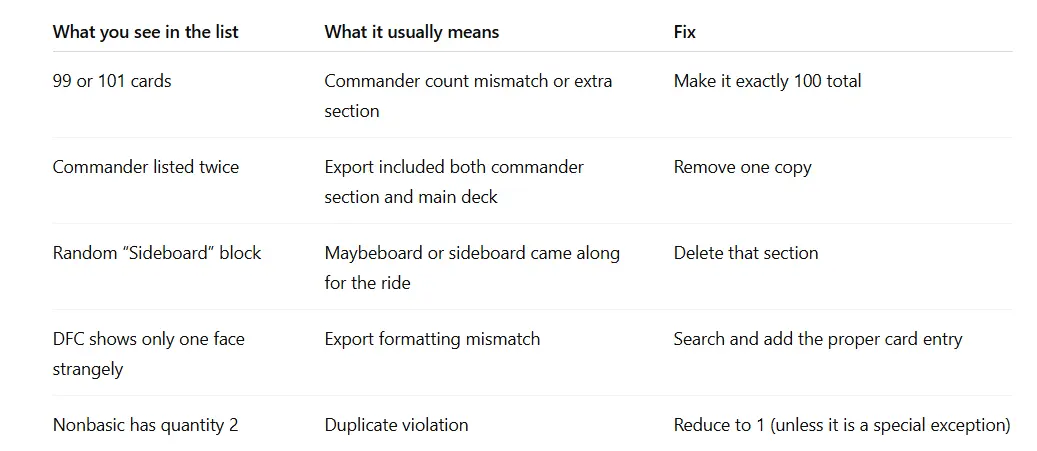
Here’s a small “spot the problem” table you can use without turning your life into a spreadsheet:
Pass 3: Proxy-readiness checks (smooth gameplay is the point)
A proxy order is successful when nobody has to stop the game to figure out what your card is.
1) Pick readable versions, not “I swear this is cool”
Some alternate frames and full-art treatments are gorgeous. Some are basically a practical joke when you’re trying to read rules text across the table.
Your audit move: for any card you expect to see often (ramp, removal, staples), choose the version you can parse quickly. Save the maximalist art choices for splashy cards that hit the table once and end the game.
2) Double-faced cards: handle them cleanly
DFCs are the #1 “wait, what am I actually printing?” card type.
If you are ordering through ProxyMTG specifically, selecting a double-faced card prints both sides as a proper two-sided card, which saves you from the “two proxies and a lot of regret” approach. That means your audit is simply: confirm you included the DFCs you actually play, and that you didn’t accidentally add a checklist card or the wrong face entry. (If you are using a different method, make sure you have a consistent plan for representing both faces.)
3) Tokens and trackers: optional, but your future self likes them
You do not need to print every token your deck could theoretically create. You do want tokens you create constantly, plus anything that avoids confusion (monarch, initiative, emblem-style effects).
A good rule: if your deck makes the same token three times a game, print it. If it makes it once a month, a sticky note is fine.
4) Consistent sleeves and backs, so nobody develops “marked card” theories
Even in casual play, you want consistency. Same sleeves, same opacity, same feel. Nobody wants to be the person who has to say, “I think I can feel the proxy land.”
If you want a quick reminder on proxy boundaries and how to keep things normal, read Are MTG proxies legal to own or print?.
Pass 4: The “this will save you money” sanity check
This last part is not about legality. It’s about not ordering 100 cards when you are currently on version 0.7 of the deck and still emotionally attached to three different themes.
The test batch rule
If your list has changed more than five cards in the last week, you are not “done.” You are in the experimentation phase.
Order a smaller batch first:
the expensive staples you want to test
the new cards you are unsure about
the mana base changes you are actively evaluating
Then play two nights. Adjust. Print the rest when the list stops doing chaotic things.
If you want the broader “why test first” argument in one place, see Using MTG Proxy Cards to Test Your Deck before Buying Expensive Cards.
A final note on sanctioned play (because someone will ask)
This is not legal advice. It’s also not a loophole tutorial.
In sanctioned Magic events, authentic cards are required, with narrow judge-issued exceptions for damage during the event. For casual Commander, what matters is your pod and your store’s policy. Ask first, keep proxies readable, and do not do the “surprise, half my deck is playtest cards” reveal on turn three.
FAQs
Do Commander decks have to be exactly 100 cards?
Yes. Exactly 100 cards total, including your commander.
Can I run duplicates in Commander?
Generally no, except basic lands, plus a small number of special cards that explicitly override the rule.
Does Commander have a sideboard?
Not by default. Some groups use house rules, but normal Commander deck construction does not rely on sideboarding between games.
How do companions work in Commander?
If you use a companion, it must follow Commander’s rules and color identity requirements. It is not part of the 100-card deck, but it’s still a deckbuilding constraint you have to satisfy.
What’s the single most common pre-checkout mistake?
Printing the wrong total count (99, 101) or accidentally duplicating the commander.