
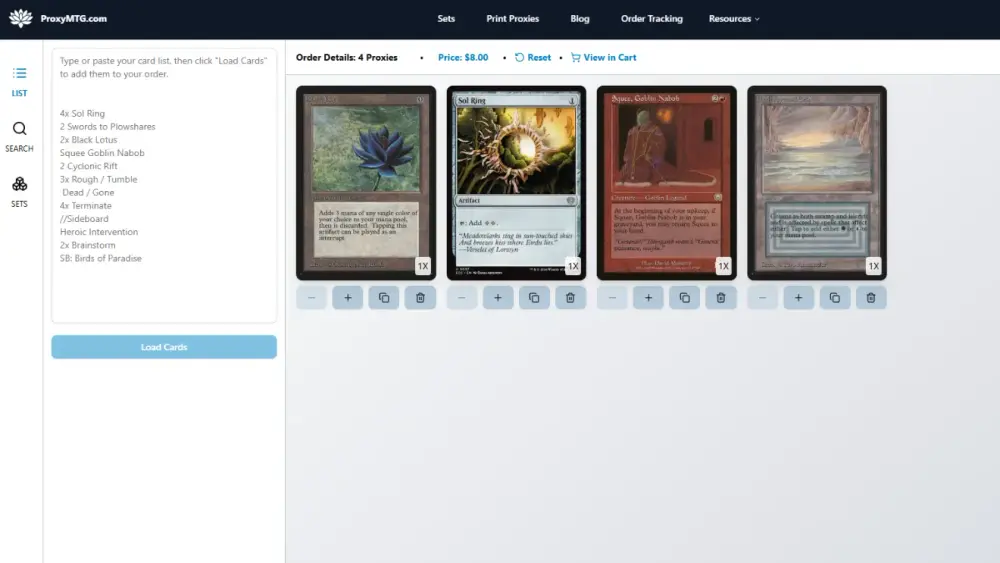
TLDR
If your decklist upload “mysteriously” fails, it’s usually a typo, a smart quote, a header line, or a card name format your parser hates.
Do a quick three-pass cleanup: sanitize (remove junk), standardize (use real card names), specify (add set code/collector number only when you actually need a specific printing).
Weird names are normal in MTG. Your list just needs to be boring enough for machines to read.
If you’re printing for casual play, prioritize readability over “coolest frame you saw once on Twitter.”
Decklists are the only kind of “document” where one invisible character can ruin your whole evening. And yes, the robot will absolutely reject your list because you typed “Gaea’s Cradle” with a fancy apostrophe. MTG decklist hygiene is how you stop losing time to nonsense and start getting back to the part where you actually play Magic.
This post helps players who copy/paste decklists clean them up (typos, set codes, odd card names) so they can upload and print without surprise errors.
Why MTG decklist hygiene matters
A clean list does three things:
It imports correctly (into builders, printers, tracking tools, whatever you’re using).
It selects the cards you meant, not the “close enough” cousin from 2006 with different art and a different frame.
It makes your order review faster because you’re not playing detective with your own clipboard history.
Also, if you’re printing proxies for casual play, clarity is the entire point. Nobody wants to squint at your “totally readable” proxy while you insist it’s “obvious” what the card does. That is how friendships become more casual than Commander.
The three-pass routine
You do not need a 37-step process. You need three boring passes that catch 95% of problems.
Pass 1: Sanitize the list (remove junk)
Your parser generally wants one card per line in a simple format, like:
1 Card Name
Optional bits may be allowed, but keep it simple until you know you need more.
What to remove or fix:
Section headers like “Creatures (28)”, “Ramp”, “Sideboard”, “Commander”, “Maybeboard”
Blank lines and weird spacing
“x1” / “1x” prefixes (some tools accept them, some don’t)
Notes like “cut this later” (you will not cut it later, and the robot will not forgive you)
If you want categories for yourself, keep a “human list” and a “printer list.” Your future self can have vibes. Your import tool wants obedience.
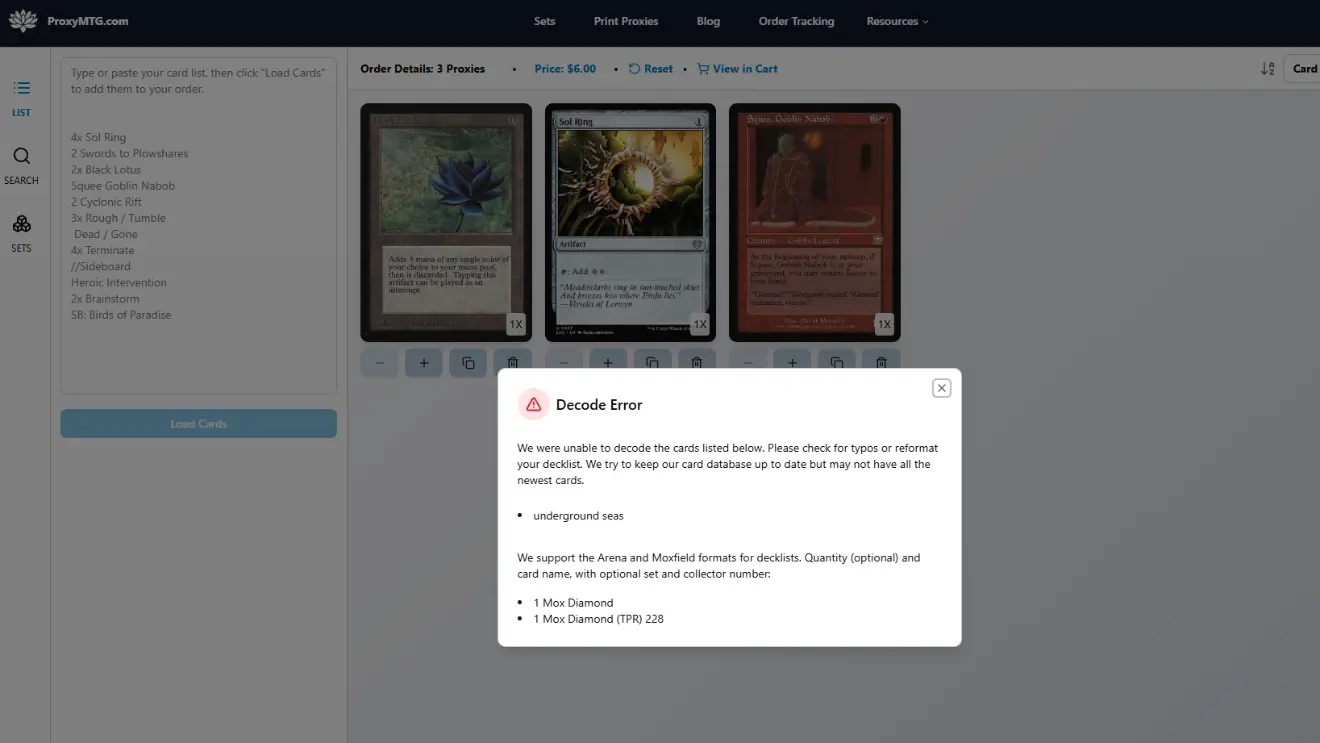
Pass 2: Standardize names (use the actual card name)
This is where most decklists go to die. Not because you did something unreasonable, but because Magic card names are what happens when fantasy writers discover punctuation.
Common offenders:
Smart quotes: “Gaea’s Cradle” (curly apostrophe) vs “Gaea's Cradle” (normal apostrophe)
Ligatures and accents: “Æther” vs “Aether”, “Lim-Dûl” vs “Lim-Dul”
Nicknames: “Bob”, “Gary”, “Steve” (fun at the table, useless to a parser)
Partial names: writing the Adventure half, the backside, or a nickname instead of the card’s real name
Quick fix that works almost every time: copy the card name from a reliable database entry instead of trusting your memory, autocorrect, or vibes.
Pass 3: Specify printing only when you need to
Set codes and collector numbers are powerful. They also create extra ways to be wrong.
Use them when:
You want a specific art/frame for readability (or theme)
The card name is ambiguous or shared across variants you care about
Your list came from a tool that already includes set codes and you want to keep that specificity
Skip them when:
You just want the card, any normal printing is fine
You are troubleshooting an import problem (simplify first, then add complexity back)
Typos that break imports (and how to spot them fast)
A typo is not always “I misspelled the card.” It’s often one of these:
1) Invisible characters
Copy/paste from PDFs, Discord, Notion, or “that one website” can insert hidden characters. If a single line fails repeatedly, retype it manually.
2) Extra punctuation
Commas, colons, and apostrophes are fine when they’re real. They’re not fine when they’re the wrong kind (smart punctuation). If a card has punctuation, it’s worth a second look.
3) Wrong separator expectations
Some tools are picky about whether quantities come first, whether set codes are in parentheses, or whether collector numbers are present. If you’re not sure, export in a plain text format and start from there.
Here’s a simple “do this, not that” cheat sheet:
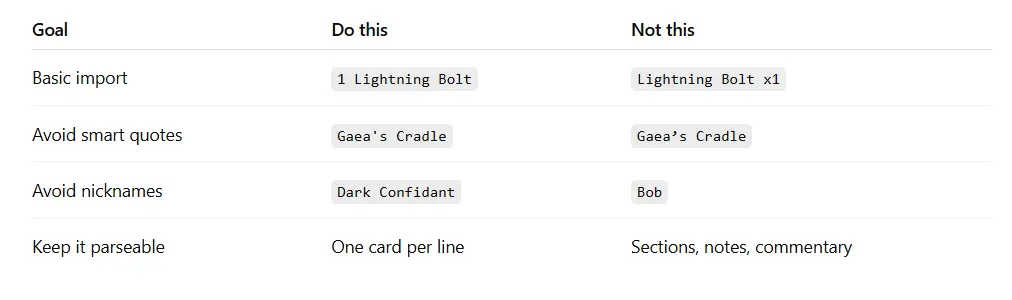
Yes, it’s less fun. That’s why it works.
Set codes and collector numbers, explained like you have a life
A set code is the short code for a Magic set/printing. A collector number is the number printed on the card within that set.
Why you might care:
You want the most readable version (some frames are gorgeous, some are a UI crime)
You want a specific art for theme
You want consistency across the whole deck (matching basics, matching frame style, etc.)
Why it sometimes goes sideways:
Set codes are not always just three letters, and promos/tokens can have longer or unusual codes
Collector numbers can include letters or special formatting in some cases
One wrong character means you get a different printing, or no match at all
Practical approach:
Start name-only. Confirm the list loads.
Add set codes only for the cards you truly care about. Your deck does not need a specific printing of “Counterspell” unless you’re building a museum exhibit.
“Weird card names” and the formats that confuse tools
Magic has a few card structures that routinely trip up imports. The fix is usually just “use the front face name,” but here’s what to watch for.
Split cards and the “two names” problem
Split cards often show up with a // between names. Some tools accept that, some want the primary name formatting exactly. If your import fails, try searching the card by its main name and copy it from the database entry.
Double-faced cards (DFCs and MDFCs)
Double-faced cards are normal now, which is great for gameplay and less great for text parsers written in 2013.
If your list includes the full “front // back” format and it fails, try using just the front face name. If you are printing proxies, make sure your printing workflow supports DFCs as true two-sided cards so you do not end up doing the “two proxies in one sleeve” circus.
Adventures, aftermath, and “I typed the spell half”
A common mistake is listing the Adventure spell (or a component name) instead of the card’s real name. If you typed “Stomp” and wondered why the tool complained, that’s why. Use the creature’s full card name.
Secret Lair titles, Showcase names, and other fancy variants
Some variants have stylistic punctuation or naming that is more art project than database key. If something looks “special,” treat it as suspicious until confirmed by a canonical name.
A checklist you can actually use (no spreadsheets required)
Do this right before you upload anywhere:
Decklist Hygiene Checklist
Every line starts with a quantity (or your chosen consistent format)
No headers, no categories, no notes
Replace smart quotes with normal quotes/apostrophes
Replace special characters with plain equivalents if needed (AE instead of Æ, etc.)
For DFC/split/adventure weirdness, confirm you’re using the canonical card name
Only add set codes and collector numbers for cards where printing choice matters
If the upload fails:
Remove all set codes/collector numbers and try again
If it works, add specificity back in small chunks (not all at once)
Yes, this is tedious. That’s why you want to do it once.
FAQs
What’s the safest decklist format for uploads?
A plain text list with one card per line, quantity first (example: 1 Sol Ring). Start simple, then add set codes only if you need to lock specific printings.
Do I need set codes and collector numbers to print proxies?
Usually no. They’re helpful when you want a specific art/frame, but they also add failure points. Name-only is the best troubleshooting baseline.
Why does one card fail when the rest of the list works?
Most often it’s smart punctuation, a hidden character from copy/paste, or you used a nickname/partial name. Retype that line manually or copy the name from a database entry.
How should I write double-faced cards in a decklist?
If your import struggles with the “front // back” format, use just the front face name and confirm your printing workflow supports true two-sided printing for DFCs.
Is decklist hygiene only for proxies?
No. This helps with deck builders, collection trackers, buylist tools, and anything else that tries to parse your list. Computers love consistency. Humans love chaos. Meet in the middle.